All how-to videos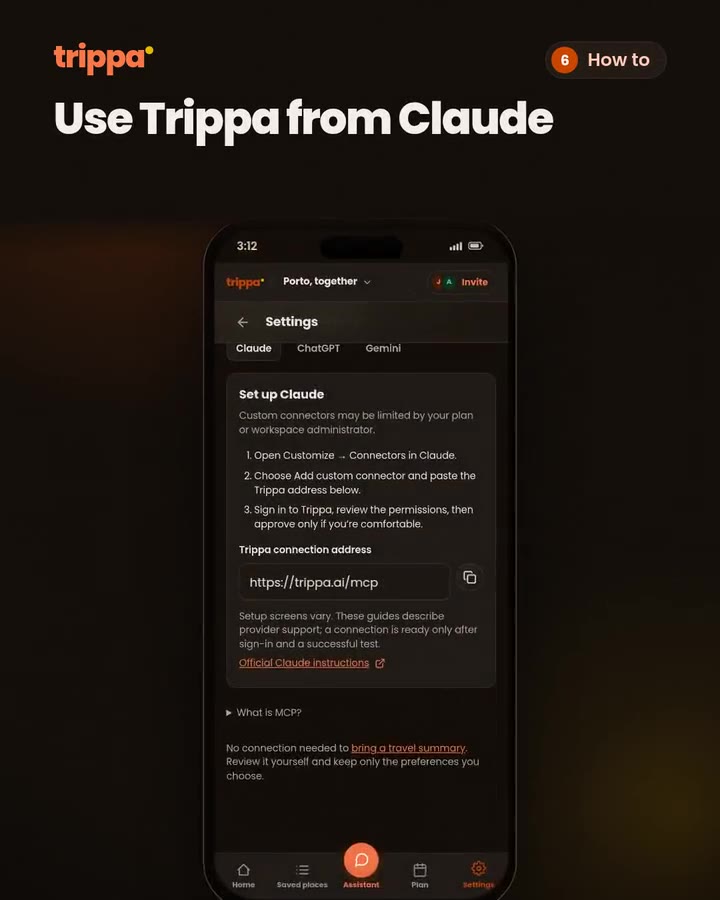
How-to video · Connect
How to plan your trip from Claude
Connect Trippa to Claude once, then plan from the chat. Changes land on the shared plan.
Use Trippa from Claude · 41 seconds · No sound · Claude screens are illustrative.
Step by step
- In Trippa Settings, copy the connection address.
- In Claude, add Trippa as a custom connector.
- Sign in to Trippa and allow access.
- Ask Claude about your trip.
- Changes show up on everyone's plan.